Open source MCP server
Pitch decks that move, built by your Claude.
Describe your company and add your logo. Claude shapes the story and the design, InstaDeck turns it into a branded presentation with motion, checks every slide and hands you the deck.
Settings, Connectors, Add custom connector, paste the link. Works in claude.ai and Claude Desktop on every plan, and the deck plays right in the chat.
https://instadeck.app/mcp
Run this once, then ask for a deck in any project.
claude mcp add --transport http instadeck https://instadeck.app/mcp
Add it to ~/.cursor/mcp.json, or to .cursor/mcp.json in a project.
{ "mcpServers": { "instadeck": { "url": "https://instadeck.app/mcp" } } }Run this once, then use it in Copilot agent mode.
code --add-mcp '{"name":"instadeck","type":"http","url":"https://instadeck.app/mcp"}'Add it to ~/.codex/config.toml.
[mcp_servers.instadeck]
url = "https://instadeck.app/mcp"
Run this once, then ask for a deck.
gemini mcp add --transport http instadeck https://instadeck.app/mcp
Add it to ~/.codeium/windsurf/mcp_config.json.
{ "mcpServers": { "instadeck": { "serverUrl": "https://instadeck.app/mcp" } } }A standard MCP server over streamable HTTP, with no sign in. Point any client that supports remote servers at this address.
https://instadeck.app/mcp
Free, no accountRun it on your computer instead
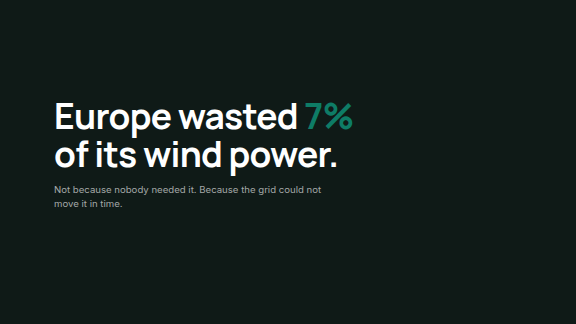
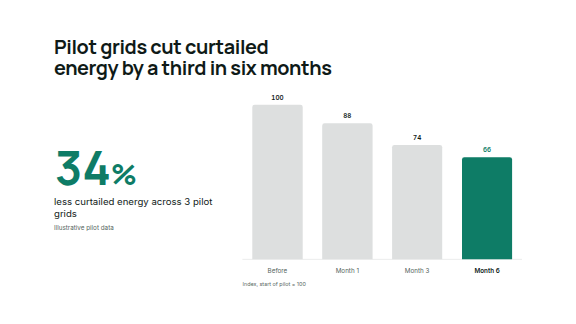
Seed pitch deck for Northwind. We predict grid congestion hours ahead, so operators stop throwing away wind power. Three pilots are live and cut curtailment by a third. We are raising €4M to go from 3 to 20 grids.
- Idea
- A calm, confident investor deck where one number per slide makes the case that clean energy is being thrown away
- Story
- Story spine
- Type
- Manrope and Inter
- Motion
- Subtle. Seed investors judge clarity and judgment. Short rises and a quiet fade guide the eye without performing, the numbers are the only thing that moves on its own.
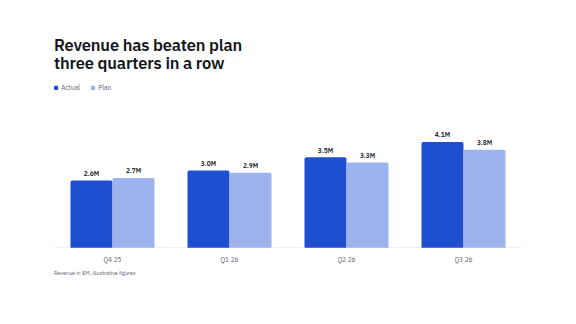
Q3 board update for Harborline. Revenue $4.1M against a plan of $3.8M and burn flat, but two senior engineering hires slipped. Answer first, and end with the two decisions we need: the Q4 plan and $1.2M for hiring.
- Idea
- A board pack that gives the answer first and lets the numbers speak in plain, consistent order
- Story
- Situation, Complication, Question, Answer
- School
- IBCS notation
- Type
- IBM Plex Sans
- Motion
- Still. A board reads numbers and decides. Nothing moves, slides change with a quiet fade, so every second goes to the content and the discussion.
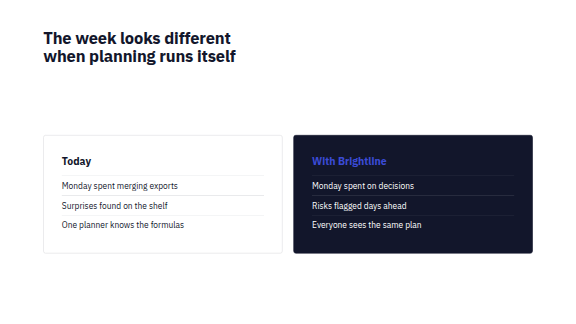
First call deck for the operations team of a mid-size retailer. Brightline replaces stock planning in spreadsheets. Lead with what stockouts cost them, then the pilot results, the six week rollout and pricing per store. Sober, no hype.
- Idea
- A sober buyer's document: the customer's own cost numbers, laid out with engineering order
- Story
- Motivated sequence
- School
- Functional design
- Type
- IBM Plex Sans
- Motion
- Subtle. Enterprise buyers read for risk. Fades keep attention on the proof, counting numbers and growing charts carry the only motion.
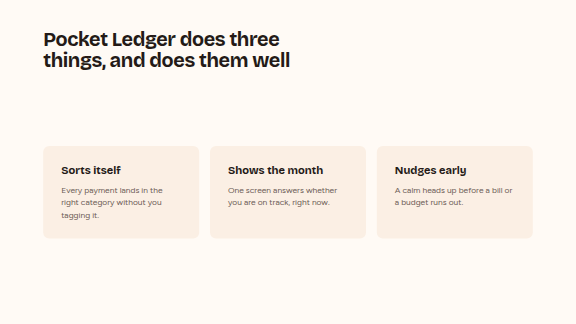
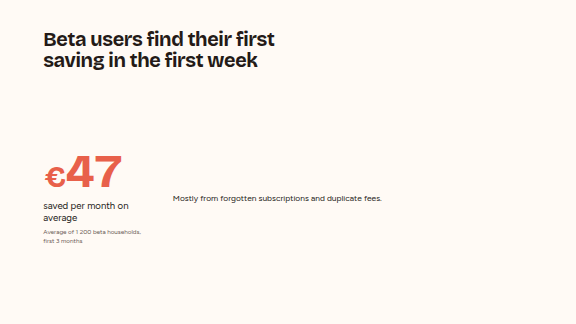
Launch deck for Pocket Ledger, a money app that sorts your spending by itself. For press and early customers, we launch on 3 November. Warm and friendly, short lines. The beta has 4,200 users who save €47 a month on average.
- Idea
- A warm, energetic launch that shows everyday life getting easier, one short line at a time
- Story
- What is and what could be
- School
- Warm humanist
- Type
- Bricolage Grotesque and Figtree
- Motion
- Expressive. A launch should feel like momentum: every slide pushes the story forward, content rises briskly, one hero moment per slide.
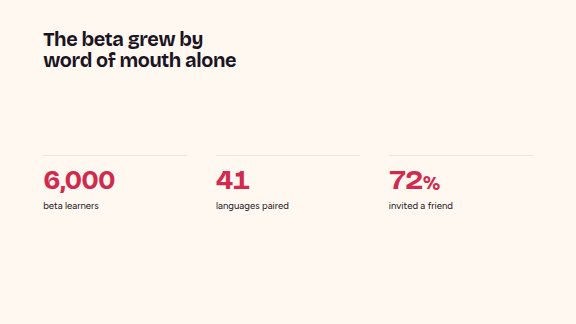
Launch keynote for Tandem, the language app where you practice with a real partner ten minutes a day. Playful and full of motion, like the app. 6,000 beta learners, streaks 3.4 times longer than alone, free to start.
- Idea
- A playful, kinetic launch where the motion itself shows that learning together is more fun
- Story
- What is and what could be
- Type
- Bricolage Grotesque and Figtree
- Motion
- Kinetic. Tandem is a playful app for people who learn together. The deck should feel like the app: springy, quick and a little cheeky, still one thing moving at a time.
These are the golden examples that ship with InstaDeck, which Claude reads before it builds yours. Companies and numbers are made up.
How it works
You bring the company. Claude and InstaDeck bring the craft.
Claude decides what to say and how it should look. InstaDeck renders, measures and exports, so the result holds up on a big screen.
You describe it
The company, the audience and the ask, in a sentence or a page. Add your logo, brand fonts, photos or screenshots.
Claude shapes the story
It picks one of 7 narrative frames for the audience, orders the beats, and asks you for the numbers and proof it does not have instead of making them up.
Claude designs it
It sets a visual concept, draws on 11 design schools and composes every slide from 20 layouts and 16 building blocks, in your colors and type.
InstaDeck makes it right
Every change is rendered, measured and checked. Claude sees what does not fit, what reads weakly and what moves too much, and fixes it.
What you get
Built like a design team would build it.
Every slide below comes from the decks above. Each one is composed from a layout, set in the brand's type and checked for fit, contrast and balance before anyone sees it.

Story
A story with a spine
Every deck follows a declared frame, from Minto's pyramid to Duarte's what is and what could be. InstaDeck checks that it opens with a hook, closes with the ask, and that every claim that needs proof carries it. Speaker notes go to the presenter view and to PowerPoint.
Brand
Your brand, enforced
Colors read from your logo become a full design system with a modular type scale and checked contrast. 27 curated typefaces, or your own font files.
Assets
Your assets, placed with intent
Logos sit where a title or a close needs them, screenshots and photos go into layouts built to carry them, and an image that continues to the next slide glides there instead of appearing twice.
Motion
Motion with intent
Claude designs a motion language for each deck, from perfectly still to kinetic: its own entrances and transitions, headlines that glide from slide to slide, numbers that count up. Every move is measured against how people perceive it.
Output
Present, share, download
Every deck presents full screen with an overview and a presenter view. Download it as PDF, as PowerPoint with editable text and native charts, or as one HTML file that works offline.
Clients
Works where you are
Plays in the chat in claude.ai and Claude Desktop, opens from a link anywhere, or runs entirely on your computer. Any MCP client can use it.
The full list Claude reads from the serverPlanned items are marked. Nothing here is promised that is not there.
Show
Planned items are marked. Nothing here is promised that is not there.
- Knows how great pitch decks are built: story beats and narrative frames (classical rhetoric, Minto, Duarte, Toulmin and more), design schools (Swiss, editorial, keynote, data journalism, IBCS and more), layouts, typography, color, motion and the design, storytelling and motion principles behind them. Asks you for the numbers and proof a story needs instead of inventing them.
- Turns a logo and brand files into a brand kit: colors read from the logo, brand fonts, logo variants and tone. Suggests a coherent system (readable palette, font pair, type scale) from a primary color and a mood, and checks the brand kit for contrast and fonts.
- Cards can carry an icon from a curated set of 32 (risk, growth, delivery, partnership and more) that stands for what the card means, drawn in the text color and exported to PowerPoint as pictures.
- Gives a deck without photos a deliberate look: the title and chapter slides can carry a large chapter number, a color field or a thin accent line, drawn from the brand colors, with the contrast of the text on them checked, and exported to PowerPoint. A slide can also take an image you supply as its background under an overlay, and the browser measures the text over it and tells how strong the overlay must be.
- Shows proven example decks (seed pitch, enterprise sales deck, product launch, board update, consumer launch) with the reasons they work, from a deck that does not move to a kinetic one, so a new deck starts from a good structure and a fitting motion language.
- Creates and edits branded pitch decks with revisions: every change is validated, versioned and can be reverted.
- Lets Claude design the motion language of each deck: from a deck that does not move to kinetic, with its own entrances and transitions as keyframes and elements that glide from slide to slide.
- Checks every deck for text that does not fit, low contrast, overlong text, motion that does not match its declared intensity, motion that speeds into place or overshoots, and repetitive layouts.
- Plays the deck right in the chat in clients that show apps (claude.ai, Claude Desktop), full screen on request, measures every slide and its motion in your browser so Claude can fix what is off, and lets you pick a slide in the chat and say what to change.
- Gives every deck a link that opens the animated presentation in any browser, with an overview of all slides and a presenter view, and downloads it as PDF, PowerPoint (editable text, native charts, speaker notes) or one HTML file. Decks are kept for 30 days.
Install
Works in any MCP client
One server, two ways to run it. The hosted connector needs nothing installed, the local server keeps every deck on your disk.
Hosted
Connector in the cloud
No install, no account. In Claude the deck plays right in the chat, elsewhere you get a link to present. Decks are kept for 30 days, download one to keep it.
https://instadeck.app/mcp
Local
On your computer
Decks as folders you keep, slide previews for Claude and PDF export. Needs Node 20 and Chrome, Edge or Chromium, and works with any client that starts a stdio server.
claude mcp add instadeck -- npx -y instadeck
Made and tested with Claude. The design guide, the examples and the checks are tuned on Claude, and in claude.ai and Claude Desktop the deck plays right in the chat.
Open to other models. It is a standard MCP server, so Codex, Gemini CLI, Cursor or any client that calls tools can build decks with it. The checks are the same, how good the deck gets follows the model.
Free and MIT licensed
Your next deck is one sentence away.
Add the connector, tell Claude about your company and watch the deck play in the chat. Read the code, change the layouts, add your own blocks.